Your music library, on the big screen.
Mornye for macOS, Windows and Linux. Point it at your music folders and it keeps the library current, plays with synced lyrics and lets you fix tags in a sortable table.
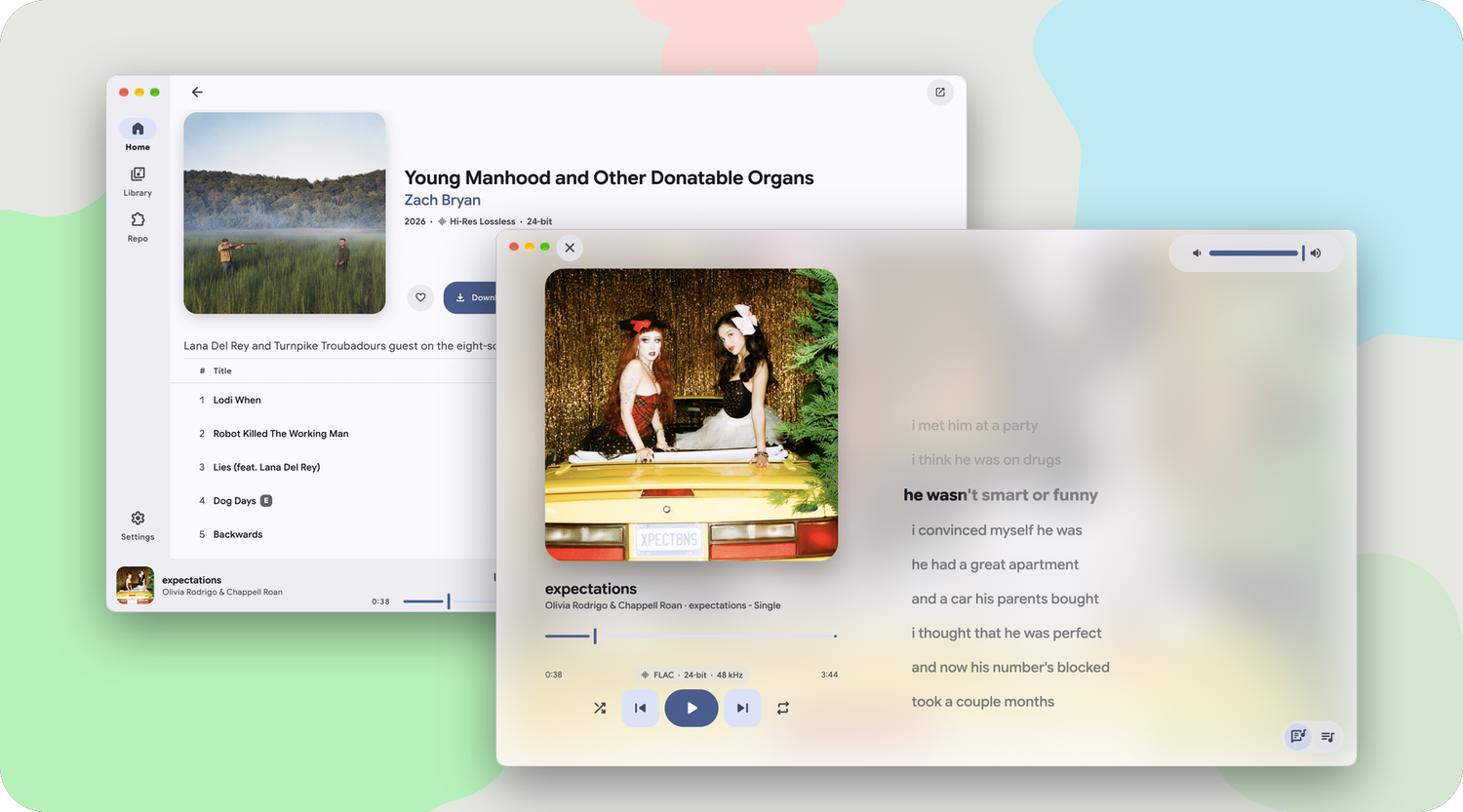
Built for a keyboard and a big window
The same Flutter and Rust core as the phone app, with a layout made for the desktop.
Made for the desktop
A sidebar with your Library pages and playlists, a floating player, a native menu bar and a window that blends into the title bar.
A player that fills the room
Lyrics and Up Next open beside whatever you are browsing. In full screen, the cover sits on one side and large lyrics on the other.
A library that keeps up
Mornye watches your folders and picks up new albums as they land. Sort songs in a table, review duplicates, edit tags and export M3U8.
Lyrics
Word-by-word timing, optional translation and romanization lines, and a provider chain you can reorder, Zarz-LRC included.
Keyboard first
Space to play or pause, Cmd / Ctrl with the arrows to skip and set the volume, Cmd / Ctrl + 1 to 5 to switch pages.
Network storage
Play from SMB, WebDAV and HTTP / HTTPS servers. An HTTPS server can be pinned to one approved certificate fingerprint.
Get Mornye 5.2.5 for desktop
- macOS
- Windows
- Linux
Common questions
macOS says Mornye cannot be opened. What now?expand_more
Open System Settings › Privacy & Security, scroll down and click Open Anyway next to the message about Mornye. You only need to do this once.
Windows shows "Windows protected your PC"expand_more
SmartScreen warns about apps it has not seen often. Click More info, then Run anyway. The portable zip works too if you would rather not install anything.
How do I run the AppImage?expand_more
Mark it as executable with chmod +x Mornye-*-linux-x86_64.AppImage, then start it. If choosing a folder does nothing, install xdg-desktop-portal and the portal for your desktop, such as xdg-desktop-portal-gtk or -kde.
How do I add my music?expand_more
Open Settings › Local Library and add your music folders. Mornye scans them, then watches for new and changed files while it is open, so you never need a manual rescan.
Where are the lyrics in full screen?expand_more
Press the lyrics button in the player, or Cmd / Ctrl + Shift + L, while the window is in full screen. Press Escape to go back.
Can I move my library from the phone app?expand_more
Yes. Back up in the phone app, then restore the backup on the desktop. Settings, history and playlists come along.
Is this app safe?expand_more
Mornye is open source. The code and the build workflows that produce these releases are public in the Mornye repository.